
Investments
On this page
- Overview
- Investment Account Structure
- How It Works
- Portfolio View
- Portfolio Summary
- Holdings List
- Asset Allocation
- Portfolio Value Over Time
- Investment Transaction Types
- Creating Investment Transactions
- Transaction Fields
- Securities Management
- Accessing Securities
- Security Fields
- Adding Securities
- Deleting Securities
- Exchange Priority
- Price Updates
- Automatic Updates
- Manual Refresh
- Manual Price Management
- Price Backfill from Transactions
- Historical Prices
- Holdings and Cost Basis
- How Average Cost Works
- Example
- Zero Holdings
- Investment Reports
- Importing Investment Data
- Key Points
- Issues
- Backfilling historical security price info does not complete
- Backfilling historical price info from transaction info
Monize provides comprehensive investment portfolio tracking with automatic price updates, cost basis calculation, and performance reporting.
Overview#
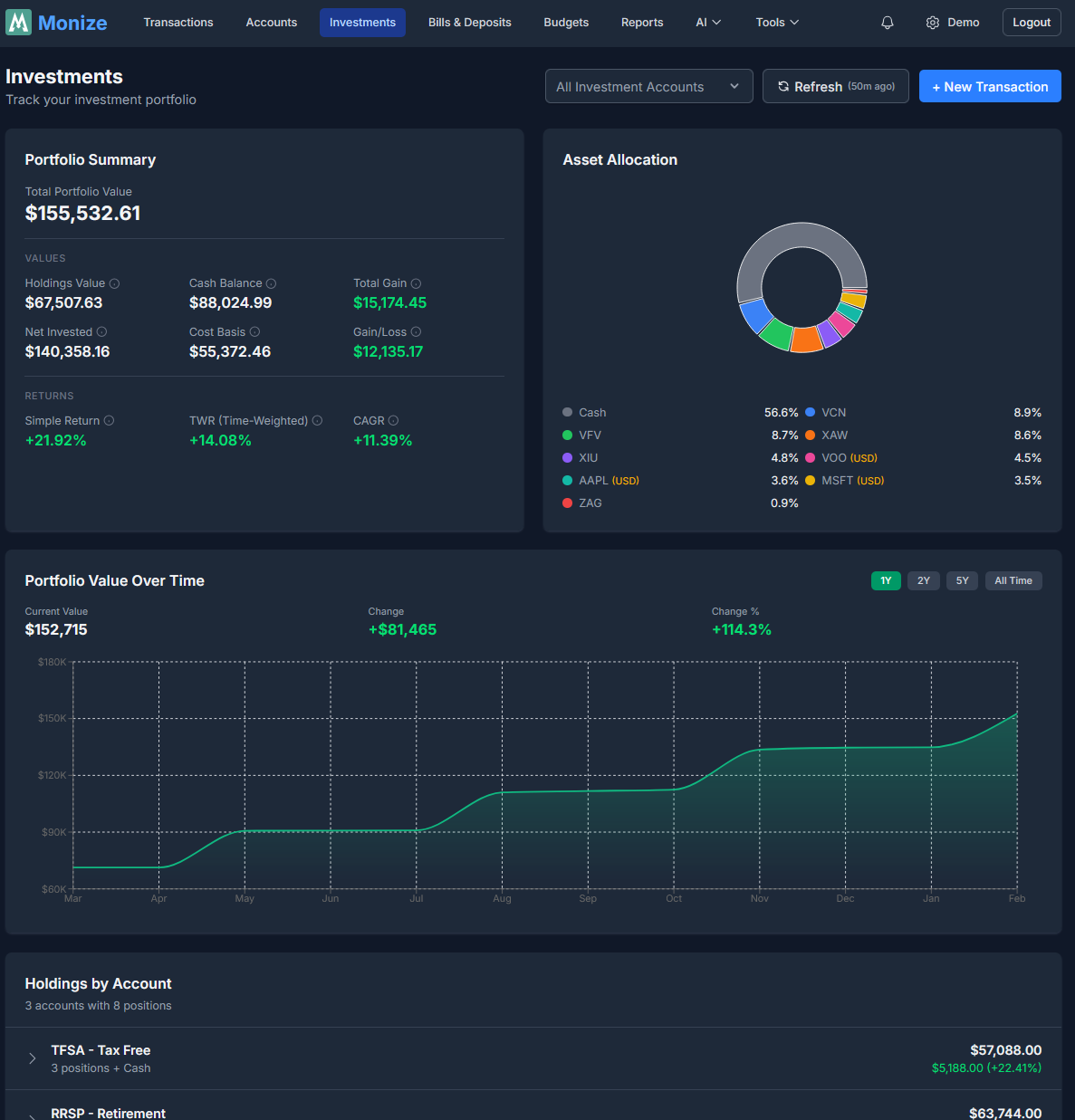
The Investments page gives you a complete picture of your investment portfolio, including current market values, unrealized gains/losses, and daily price movements.
Investment Account Structure#
Investment accounts in Monize are composed of two linked accounts:
| Component | Purpose |
|---|---|
| Brokerage Account | Holds your securities (stocks, ETFs, mutual funds, bonds) |
| Cash Account | Tracks the cash balance within the brokerage |
When you create an investment account, both components are created automatically. The cash account is hidden from the main Accounts list but is managed through the Investments interface.
How It Works#
- Buying securities decreases the cash balance and adds to holdings
- Selling securities increases the cash balance and reduces holdings
- Dividends increase the cash balance
- Transfers move cash in or out of the investment account
Microsoft Money users: In Microsoft Money, the cash and securities are combined in a single investment account. Monize separates these for cleaner transaction tracking, but the import process handles this mapping automatically.
Portfolio View#
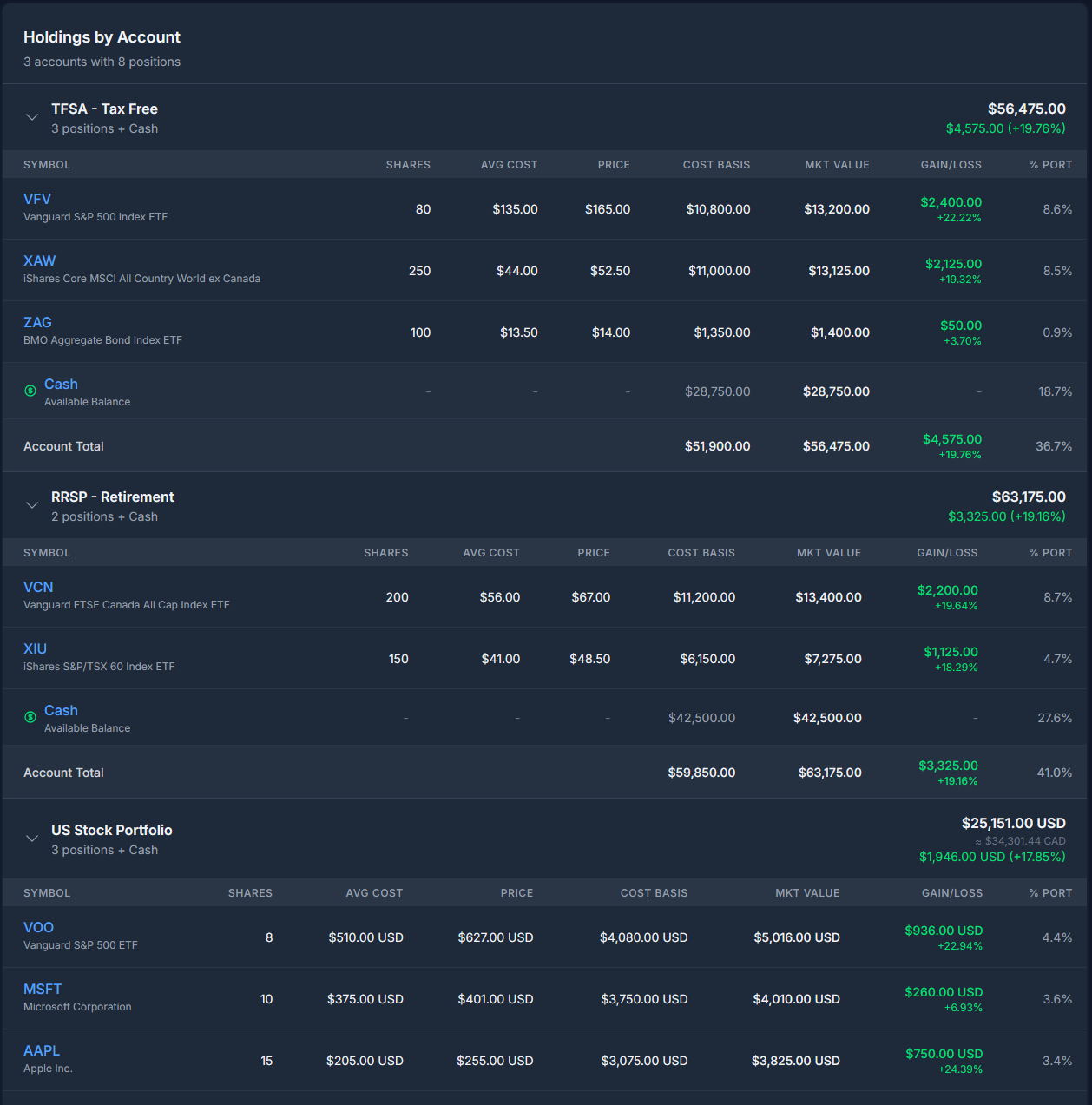
The portfolio view shows all your investment holdings grouped by account. You can filter the view to a specific account using the account selector at the top of the page.
Tip: You can navigate directly to the Investments page filtered by a specific account by clicking on a brokerage account from the Accounts page or from a brokerage favourite on the Dashboard.
Portfolio Summary#
At the top, a summary card shows:
- Total Market Value -- Current value of all investment holdings
- Total Cost Basis -- What you paid for all holdings
- Total Unrealized Gain/Loss -- The difference (both dollar and percentage)
- Cash Balances -- Total cash across all investment accounts
Holdings List#
Each holding displays:
| Column | Description |
|---|---|
| Security | Name and symbol of the security |
| Quantity | Number of shares/units held |
| Average Cost | Your average cost per share |
| Current Price | Latest market price |
| Market Value | Current total value (quantity x current price) |
| Unrealized Gain/Loss | Difference from cost basis (both $ and %) |
Holdings are colour-coded: green for gains, red for losses.
Asset Allocation#
The Investments page includes an Asset Allocation donut chart with a grouping toggle:
| Grouping | When available |
|---|---|
| By security | Always |
| By tag | Only when your holdings are tagged |
| By key | Only when your holdings carry key:value tags |
| By country | Only when country allocation data exists |
Each view shows the top 10 slices plus an Other band that groups the remaining smaller holdings. Allocation percentages always reconcile against the drawn slices, so the legend and the chart agree exactly.
- By key charts your portfolio's value-weighted split across the values of a chosen tag key (for example, splitting by a
countryorstrategykey). - By country performs a geographic look-through: rather than grouping by an ETF's listing exchange, it looks through your funds to their underlying holdings and reports true country-level exposure -- the top 10 countries individually, with the rest collapsed into an Other Countries band.
Portfolio Value Over Time#
The page also shows a Portfolio Value Over Time chart with a range selector (1D, 1W, 1M, and longer ranges up to All). A View report link opens the full Portfolio Value report for a richer breakdown.
Investment Transaction Types#
Monize supports 9 investment transaction types:
| Action | Description | Cash Impact |
|---|---|---|
| Buy | Purchase securities | Cash decreases |
| Sell | Sell securities | Cash increases |
| Dividend | Cash dividend received | Cash increases |
| Interest | Interest income received | Cash increases |
| Capital Gain | Realized or unrealized capital gains | Cash increases |
| Reinvest | Dividend reinvested as additional shares | No cash change |
| Split | Stock split adjustment | No cash change |
| Transfer In | Securities moved in from another account | No cash change |
| Transfer Out | Securities moved out to another account | No cash change |
Creating Investment Transactions#
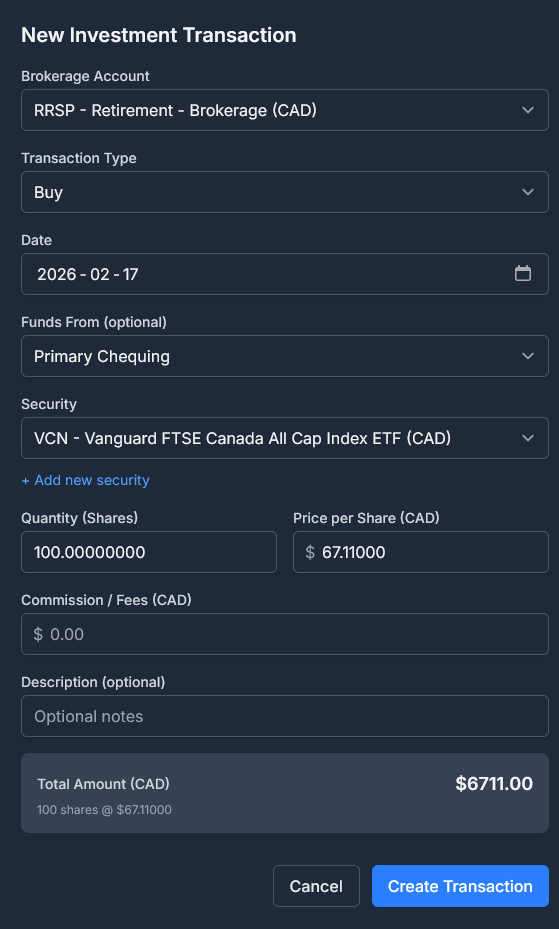
- Navigate to Investments
- Select the brokerage account
- Click Add Transaction
- Select the transaction type (Buy, Sell, Dividend, etc.)
- Fill in the details:
Transaction Fields#
| Field | Description |
|---|---|
| Date | Transaction date |
| Action | Transaction type (Buy, Sell, etc.) |
| Security | The security involved |
| Quantity | Number of shares/units |
| Price | Price per share/unit |
| Commission | Any trading commission or fee |
| Total | Calculated total (quantity x price + commission) |
| Description | Optional notes |
Securities Management#
Securities represent the stocks, ETFs, mutual funds, bonds, and other instruments you trade.
Accessing Securities#
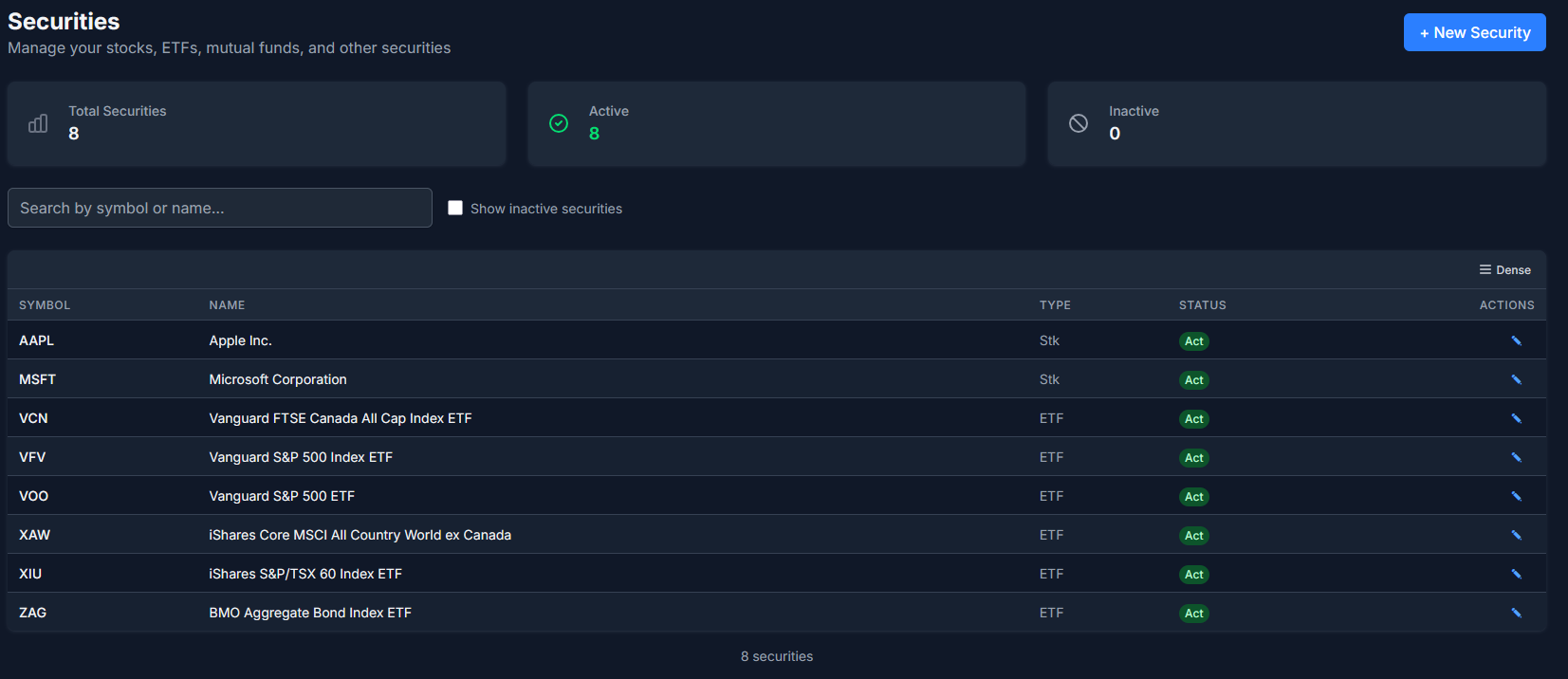
Navigate to Tools > Securities to manage your security master list.
Security Fields#
| Field | Description |
|---|---|
| Symbol | Ticker symbol (e.g., AAPL, VGRO.TO) |
| Name | Full name (e.g., Apple Inc.) |
| Type | STOCK, ETF, MUTUAL_FUND, BOND, GIC, CASH, or OTHER |
| Exchange | Stock exchange (NYSE, NASDAQ, TSX, etc.) |
| Currency | The currency the security trades in |
| Description | Free-text notes, auto-populated from the Yahoo provider profile during symbol lookup |
| Tags | User-assignable tags that drive the by-tag allocation view |
Adding Securities#
Securities can be added:
- Manually from the Securities page
- During import (mapped or auto-created from QIF data)
- Automatically when creating investment transactions
Deleting Securities#
Securities that are not used in any investment account can be deleted from the Securities page. Click the delete button next to a security to remove it. If the security is referenced by any holdings or investment transactions, it cannot be deleted until those references are removed.
Exchange Priority#
When looking up securities, Monize searches Yahoo Finance and ranks results by exchange. If you primarily invest on non-US exchanges, you can set Preferred Exchanges in Settings to prioritize results from your exchanges. See Settings > Preferred Exchanges for details.
Price Updates#
Security prices are updated automatically and can also be refreshed manually.
Automatic Updates#
- Schedule: Weekdays (Monday-Friday) at 5:00 PM EST
- Source: Yahoo Finance
- Data: Daily OHLCV (Open, High, Low, Close, Volume)
Manual Refresh#
Click the Refresh Prices button on the Investments page or Dashboard to trigger an immediate price update.
Manual Price Management#
You can add, edit, and delete individual price entries for any security. This is useful for:
- Securities not tracked by Yahoo Finance (e.g., private funds, GICs)
- Correcting incorrect price data
- Adding NAV prices for mutual funds
To manage prices:
- Navigate to Tools > Securities
- Click on a security to view its price history
- Use the Add Price, Edit, or Delete buttons on individual entries
Manual prices (source: "manual") take priority over Yahoo Finance prices for the same date. If you delete a manual price and investment transactions exist on that date, the system automatically backfills the price from the transaction's buy/sell price.
Price Backfill from Transactions#
Monize can populate security prices from your investment transaction history. When you buy or sell a security at a specific price, that price can be used to fill gaps in the price history. This is especially useful for securities with skipPriceUpdates enabled or securities not available on Yahoo Finance.
Transaction-based prices are automatically created during import. For existing data, you can trigger a manual backfill from the browser console (see Issues below).
Historical Prices#
When you import investment data or add a new security, Monize automatically backfills historical prices (up to 10 years). This ensures accurate portfolio valuation for historical reporting.
Holdings and Cost Basis#
Monize tracks your cost basis using the average cost method.
How Average Cost Works#
- When you buy shares, the total cost is added to your cost basis
- The average cost per share is:
total cost basis / total shares held - When you sell shares, the cost basis for the sold shares is calculated using the average cost
- Reinvested dividends add to both quantity and cost basis
Example#
| Transaction | Shares | Price | Total Cost | Total Shares | Avg Cost |
|---|---|---|---|---|---|
| Buy 100 | 100 | $10 | $1,000 | 100 | $10.00 |
| Buy 50 | 50 | $12 | $1,600 | 150 | $10.67 |
| Sell 75 | -75 | $15 | $800 | 75 | $10.67 |
Zero Holdings#
When all shares of a security are sold, the holding is removed from your portfolio. If you buy the same security again, a new cost basis starts from that purchase.
Investment Reports#
Monize includes 12 dedicated investment reports for comprehensive portfolio analysis. Navigate to Reports and filter by the Investment category to access them.
| Report | Description |
|---|---|
| Investment Performance | Portfolio returns, gains/losses, and asset allocation |
| Dividend & Interest Income | Passive income tracking with monthly breakdowns |
| Sector Weightings | Portfolio sector exposure from stocks and ETFs |
| Realized Gains & Losses | Tax planning with proceeds and cost basis analysis |
| Portfolio Value Over Time | Historical portfolio value trends and period returns |
| Investment Transaction History | Complete transaction log with action-type filtering |
| Security Type Allocation | Allocation by asset type (stocks, ETFs, bonds, etc.) |
| Geographic/Exchange Allocation | Geographic exposure by exchange and region |
| Dividend Yield & Growth | Yield tracking, per-security yields, and growth analysis |
| Individual Security Performance | Deep dive into a single security with price chart and trade markers |
| Currency Exposure | Currency risk analysis across your portfolio |
| Monte Carlo Simulation | Project future portfolio outcomes with thousands of randomized return paths and a saved-scenario library |
For full details, see Reports.
Importing Investment Data#
Importing investment data from Microsoft Money requires special handling. See the Importing from Microsoft Money guide for complete details.
Key Points#
- The recommended method is to import the
.mnyfile directly. Investment accounts, securities, buys, sells, dividends, reinvestments, share transfers, stock splits and price history all come across in one pass, and share counts are reconciled against Money's own open tax lots afterwards - If you use the older QIF method instead, Microsoft Money exports investment accounts as two separate QIF files: "Investment" type for securities transactions and "Regular" type for cash transactions
- Import the investment brokerage file first, then the cash file
- With QIF, securities must be mapped to existing records or created during import
- Monize automatically creates the linked cash transactions when importing investment QIF files
For the recommended QIF import order, see Recommended Import Order.
Issues#
Backfilling historical security price info does not complete#
You may encounter an issue where backfilling historical security price info doesn't work, possibly because of Yahoo Finance rate limits. To trigger a manual re-load, press F12 to open up Browser Developer Tools while logged in as a Monize administrator. Go to the console and run:
fetch('/api/v1/securities/prices/backfill', {
  method: 'POST',
  headers: { 'x-csrf-token': decodeURIComponent(document.cookie.match(/csrf_token=([^;]+)/)?.[1]) }
}).then(r => r.json()).then(console.log)
Backfilling historical price info from transaction info#
Similarly, a new feature in 1.5.8 uses security transaction history to populate the security prices. This doesn't trigger on existing datasources, but can be manually triggered from the browser console:
fetch('/api/v1/securities/prices/backfill-transactions', {
  method: 'POST',
  headers: { 'x-csrf-token': decodeURIComponent(document.cookie.match(/csrf_token=([^;]+)/)?.[1]) }
}).then(r => r.json()).then(console.log)